For Windows 10 & 11
Keep your session alive.
A lightweight, open source utility that prevents sleep mode, screen lock, and away status — so your PC stays on and your session stays active.
- No telemetry
- 8 languages
- No admin needed
- No sleep mode
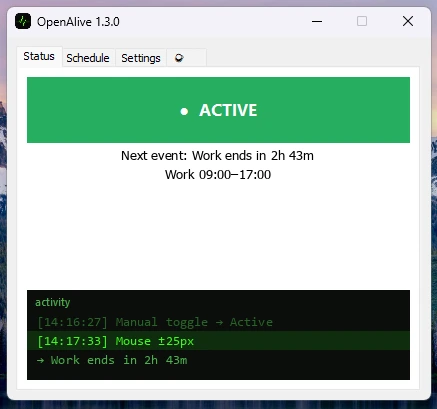
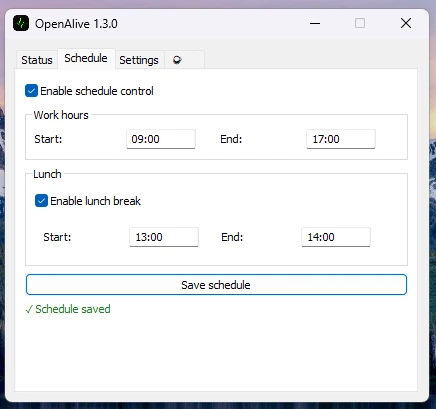
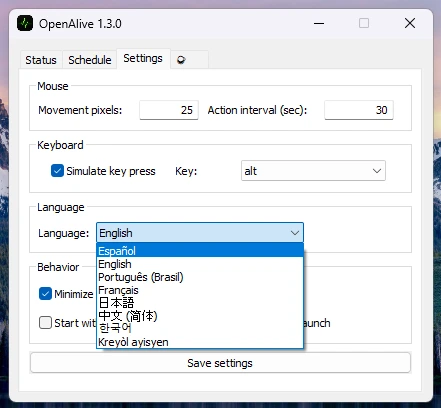
See it in action
Three tabs. That's the whole app.
Features
Everything it does — and nothing it shouldn't
-
Mouse simulation
Tiny, configurable cursor moves at a set interval — barely noticeable, enough to stay active.
01 -
Keyboard simulation
Sends a harmless key — Shift, F13, ScrollLock and more — on a schedule you control.
02 -
Schedule control
Define work hours and an optional lunch break. OpenAlive only acts when you want it to.
03 -
System tray
Lives quietly in the tray. Green when active, gray when idle — your state at a glance.
04 -
8 languages
Switch language live, no restart. English, Español, Português and five more.
05 -
Autostart
Optionally launches with Windows. No admin rights, no fuss.
06 -
Privacy first
No telemetry, no network calls, no accounts. It never leaves your machine.
07
Latest release
Download OpenAlive
One small installer. No admin rights. Installs in seconds.
Download InstallerWindows 10 (1903+) or Windows 11 · ~13 MB RAM · 6.4 MB disk
Download PortableInstallation complete
OpenAlive is ready to run.
- No admin rights required
- 3.7 MB · installs in seconds
- Zero telemetry · runs offline